Built for contractors and small crews
Construction project planning with AI Gantt charts
You already know how the job runs. Getting it into a schedule your subs and clients can see is the part that eats an evening — here it takes about a minute, and it stays useful when dates slip.
Opens straight in the editor after you sign in with Google. Free to start — no credit card required.
Why contractors use it
The schedule keeps up with the job, not the other way around
Most jobs run on a whiteboard, a spreadsheet, or the PM's memory. That works until a date slips, a change order lands, or the owner asks for a timeline. This fixes the part that breaks.
A schedule in minutes, not an evening
Describe the job in plain English — or open the ground-up schedule below — and get every task sequenced with crews and durations in about 30 seconds. No MS Project, no Primavera training.
Slips and change orders don't wreck the plan
Drag the task that moved and everything downstream reschedules itself. Framing runs two weeks over? Rough-in, drywall, and finish dates all shift with it.
Answer "when do we start?" without digging
Sitework, concrete, framing, MEP subs — each crew gets its own lane. Filter to one crew before you call them, so you're only looking at their dates.
Share it the way subs expect
Export to Excel or CSV, or keep a live Google Sheet the GC, subs, and owner can all check — no new app for anyone to install.
What you start from
A real ground-up construction schedule, not a blank page
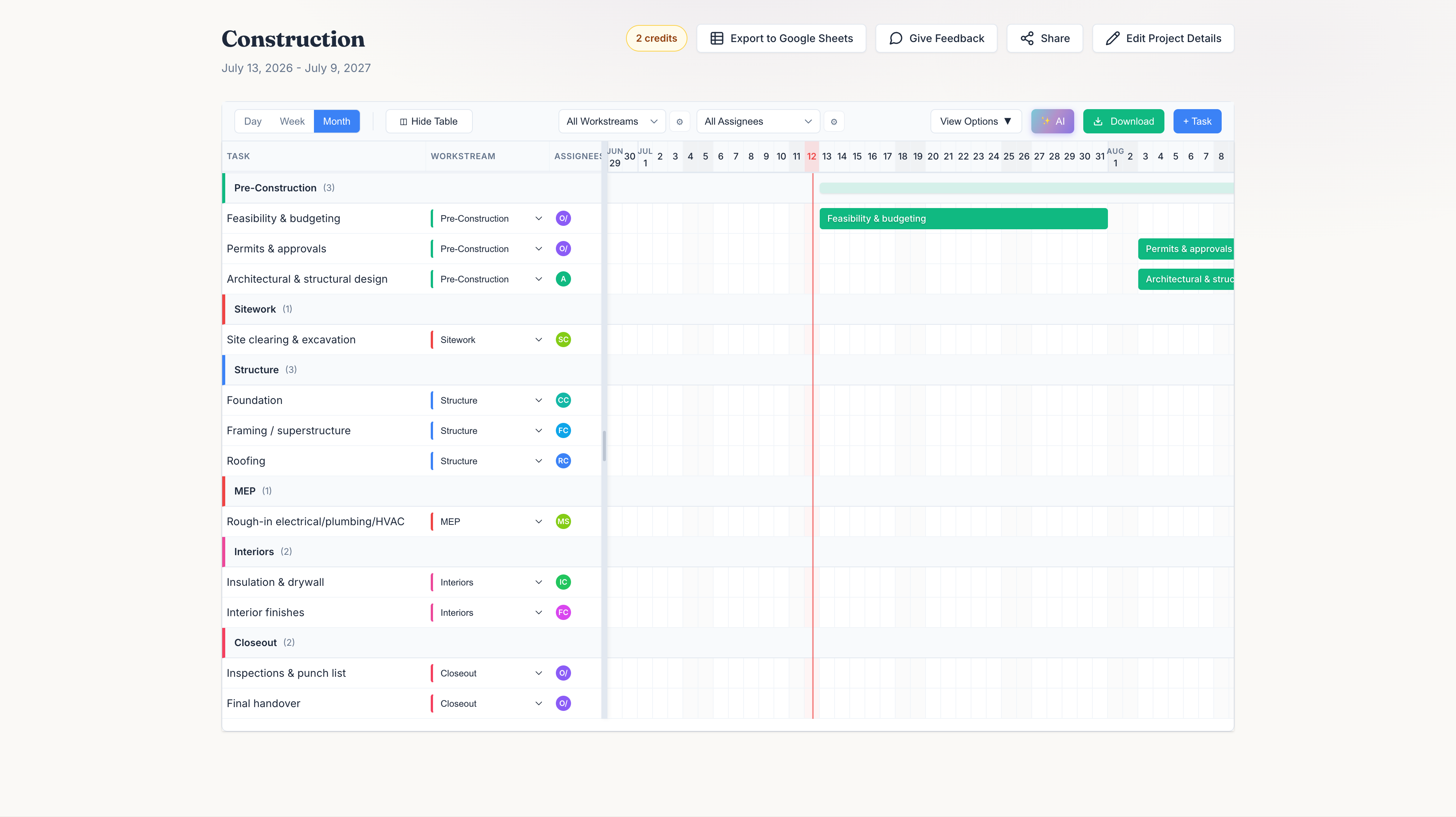
Ground-up build: permits and design through structure, MEP, finishes, and handover. This is the actual starting point — tune the durations to your job and the rest of the dates work themselves out.
Roughly 52 weeks end to end at these durations — drag any bar in the editor and the rest reschedules.
Renovating or remodeling instead?
Renovation / Remodel
Update an existing space: assessment and design through demo, rough-in, finishes, and final inspection.
About 25 weeks at these durations — tighten or stretch each phase to match your scope.
Common Questions From Contractors
Answers for contractors and small crews sizing this up before giving it a try
Yes. Describe the job in plain English, or start from the construction schedule above, and it lays out tasks, crews, durations, and dependencies in about 30 seconds — a starting point you can then drag around and adjust for your job.
Yes. The schedule sequences work the way real jobs run — permits and design before excavation, foundation before framing, framing before MEP rough-in — and you can drag tasks and adjust dependencies as the job changes.
Drag the task that moved, and everything downstream reschedules automatically. If framing runs two weeks over, the rough-in, drywall, and finish dates all shift with it — no re-planning the whole job by hand.
Yes. Every schedule can be exported to Excel or CSV, or kept live in Google Sheets, so you can share it with subcontractors and clients in the format they already use.
Yes. Alongside the ground-up construction schedule, GanttChart.AI also has a renovation/remodel schedule covering assessment, demolition, rough-in, finishes, and final inspection.
Ready to schedule your next job?
Get a full schedule down on paper before you break ground.
Build your schedule for free